Occasionally, your Maximizer CRM Outlook Integration toolbar goes missing, even though you’ve already set it up and configured it. Don’t worry; you don’t have to go through the whole setup process again. It’s simple and quick to enable it again, and we’ll explain why it does this.
What to do if the Outlook Toolbar is Missing
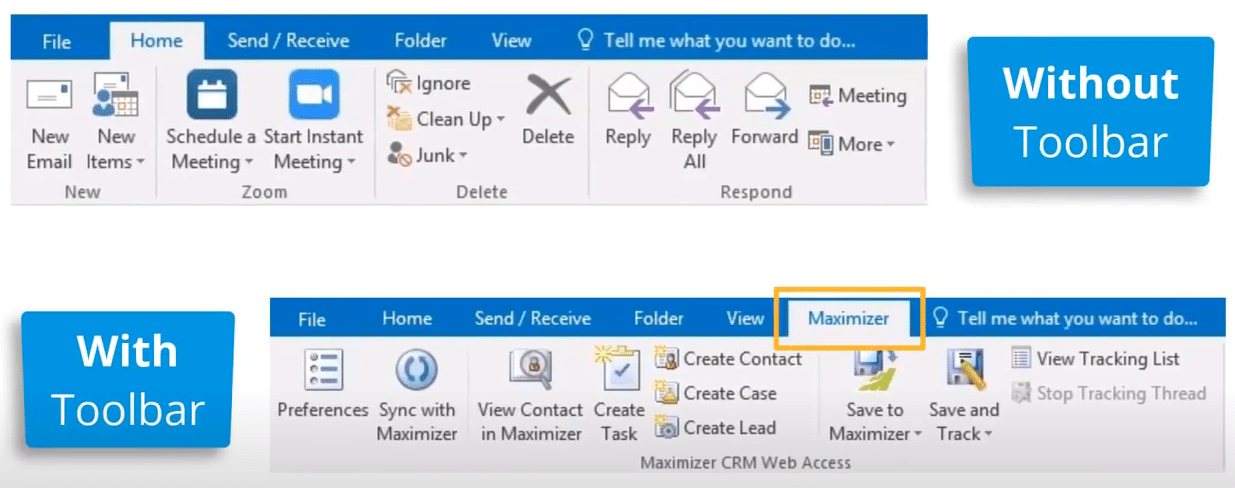
To compare the two setups, the top image below shows the Maximizer CRM Outlook integration toolbar is missing. The image underneath it shows the toolbar when it’s visible.
From the File menu, select Show ; Disabled COM-Addins.
You may see a message that the Maximizer CRM Web Access Outlook Integration caused Outlook to start slowly. However, this is not really a problem as the toolbar gives us so many benefits, including saving us time when storing emails, creating contacts, tasks, customer services cases and more.
To enable the Add-in, select File > Options > Add-ins.
At the bottom of the list of Add-ins is the Manage > COM Add-ins option. Click Go.
View the COM Add-ins and you will notice that the Maximizer CRM Outlook Integration Add-in is not enabled. Tick the integration and click OK.
The toolbar should now be visible and ready to use. Simple!
Take a look at our video tutorial on what to do if the Maximizer Outlook Toolbar is missing:
We hope you find these Maximizer CRM tutorials useful, but do contact us if you need any help with using it:
- Tel: +44 (0)1992 661244
- Email: enquiries@avrion.co.uk
- Web form here
- Subscribe to our YouTube channel