


Visualise this. A customer emails asking for five invoices, a statement, and an update on their account. Someone in customer service stops what they’re doing, pings accounts for help, hunts for documents, downloads PDFs, attaches them, and drafts a careful reply. Forty minutes later…job done.
Now multiply that by 50 similar queries a week.
This is the everyday friction that slows businesses down – and it’s exactly where AI begins to make a difference. Not in some futuristic “robot takeover” sense, but in the small, practical tasks that steal time from your team.
At Avrion, we believe AI isn’t here to replace people, it’s here to help people do their best work. And that’s an opportunity no business can afford to ignore.
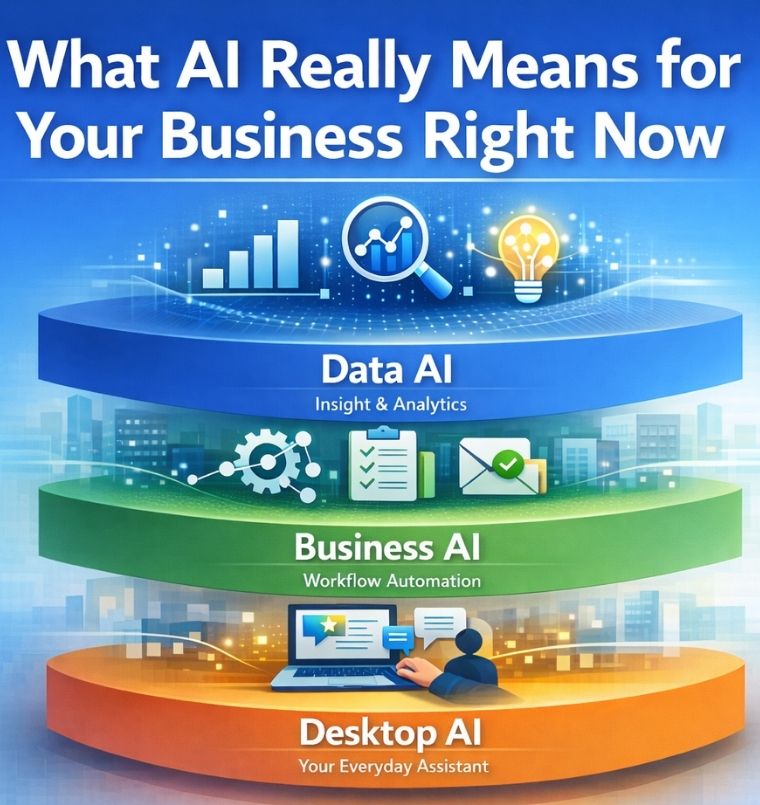
Understanding AI: The Three Layers That Matter
1. The Desktop Layer – Your Every Day AI Assistant
This is the AI that helps you get work done, your everyday AI assistant that sits right on your desk – in tools like Microsoft Copilot. It helps you research, write, summarise, tidy data, draft messages, compare files and speed up admin. This is where AI becomes part of your daily work, on your laptop, without changing how your business runs, helping you:
- Research topics, companies etc.
- Draft replies
- Compare spreadsheets
- Improve quotes
- Clean up data
- Build short documents or summaries
Many staff feel unsure about using AI – worried about accuracy, security, or simply not knowing what to ask. So our first task at Avrion is simple:
Educate people how to use AI day-to-day. Not big training courses – just clear, practical coaching. Once your team feels comfortable, the rest becomes far easier.
2. The Business Layer – Your Process Assistant
This is AI working behind the scenes in your systems and processes – reading requests, preparing information, drafting replies, gathering documents, updating systems, researching leads.
People stay in control; AI just clears the path. This is where AI is not a replacing people but instead speeding up workflow. Think of the invoice example from earlier. Instead of a person chasing documents, AI can:
- Read the customer request
- Fetch the relevant documentation
- Prepare the email
- Present everything to the user for approval
The human is always in control but AI does the legwork. This “business layer” of AI also helps with:
- Researching new sales leads
- Filling gaps in CRM records
- Drawing insights from ERP data
- Drafting personalised order acknowledgements
- Preparing customer summaries before meetings
These small improvements compound fast – especially for companies with hundreds or thousands of weekly requests.
3. The Data Layer – Your Insight Engine
This level of AI looks across your CRM, ERP, emails and spreadsheets to find trends, spot changes, summarise history and highlight what matters – giving your team instant insights before customer calls or decisions. It helps you see the bigger picture. Every business sits on huge amounts of data:
- CRM
- ERP
- Case management
- Spreadsheets
But who has time to dig through all of it?
AI can summarise trends, highlight changes, surface risks and opportunities, and prepare meaningful customer insights in minutes. Instead of scrolling through ten systems before a meeting, you read a two-minute summary.
This is where AI becomes a strategic advantage.
Key Benefits (With Examples)
1. Faster Response Times
Benefit: Customers receive answers in minutes, not days.
Example: Businesses that handle 200–2,000 weekly email enquiries. With AI taking the first pass, staff focus on the few exceptions – meaning responses happen the same day.
2. More Accurate Customer Data
Benefit: CRM and ERP stay up-to-date automatically.
Example: A salesperson receives a new lead. Instead of manually researching the company, AI gathers website details, credit info, industry categories, and more – ensuring accuracy without extra effort.
3. Better Customer Conversations
Benefit: Employees walk into meetings prepared and confident.
Example: Before a meeting, AI summarises the customer’s buying history, account status, service calls, and trends – work that used to take 20-30 minutes now takes seconds.
4. Operational Efficiency Without Hiring
Benefit: Businesses can grow without adding headcount too early.
Example: A business grows 30% year-on-year. Instead of hiring more admin staff, AI handles routine data work and customer tasks, so the team can focus on higher-value interactions.
Day-to-Day Operational Benefits
AI isn’t a single project. It’s a series of small wins that ripple across the organisation.
- Tasks that took 20 minutes take 2.
- Teams manage higher volumes without stress.
- Customers get faster, more personalised service.
- Data quality improves automatically.
- Employees spend time on work that matters.
The result? A business that moves faster – and feels calmer.
Real World Industry Examples
Every sector has admin-heavy processes. AI simply removes the friction.
Manufacturing
AI speeds up order confirmations, provides accurate lead research, and summarises supplier or customer activity.
Professional Services
Quickly prepare client summaries, pull relevant documents, and automate meeting prep.
Wholesale & Distribution
Automate invoice requests, stock enquiries, order updates, and trend monitoring.
Training Providers & Education
Research new employer leads, summarise student activity, and support data compliance tasks.
Financial Services
Gather compliance-relevant data, prepare client histories, and streamline email-heavy processes.
Tips on How to Introduce AI Safely and Sensibly
1. Start at the desktop level
Build confidence with Copilot before introducing deeper automation.
2. Keep humans in control
AI prepares, humans approve. Every time.
3. Organise your data first
A tidy data layer (via integration or middleware) lets AI perform reliably.
4. Use secure, licensed AI only
Avoid employees uploading sensitive files to public AI tools. Licensed Copilot inside your Microsoft tenant prevents data leakage.
5. Start small, deliver quickly
Each AI project should be days, not months. Test, learn, expand.
How Avrion Helps
We don’t deliver AI in isolation. We combine it with everything else we already do. AI is now woven into every part of business technology, enhancing the tools companies already depend on rather than replacing them. Whether it’s CRM, automation, integration or intelligence, AI helps people do the work, move the work and understand the work more efficiently. From smarter CRM experiences in Maximizer and Dynamics, to AI-assisted workflows, connected systems and deeper insights across data, each solution now comes with an AI option – an intelligent layer that speeds up routine tasks, improves accuracy and gives teams the confidence to focus on what matters most: serving customers better.
Maximizer CRM | IQ Boost
Maximizer’s IQ Boost adds intelligent insights directly inside the CRM – helping teams understand customer behaviour faster, clean up data automatically, and respond with greater confidence. It surfaces next steps, trends, and opportunities so your people can focus on strengthening customer relationships.
Microsoft Dynamics 365 | Copilot
Microsoft’s Copilot gives every user an AI assistant inside their workflow – drafting content, summarising records, and preparing updates across Sales, Service and Operations. It reduces admin, improves data quality, and helps staff move through tasks faster with full user control. All securely deployed inside your Microsoft 365 tenant.
Business Automations
AI-powered Business Automations let systems handle the legwork – reading requests, gathering documents, drafting replies, and updating CRM for user approval. AI accelerates workflows, turning hours of admin into minutes and improving response times dramatically.
Integrated Software
Integrated systems give AI safe, reliable access to the data it needs – without straining CRM or ERP platforms or relying on manual lookups. With connected systems and middleware, AI retrieves information, checks details, and updates records seamlessly.
Web Portals
AI-powered Web Portals give customers and internal users instant answers by allowing them to ask a secure, business-trained chatbot for the information they need – from account queries to document requests. Instead of waiting for manual responses, AI can surface relevant data, draft replies, and guide users to the right content, creating a faster, more personalised self‑service experience while reducing pressure on your team.
Business Intelligence
AI-enhanced BI reveals the bigger picture by analysing patterns across CRM, ERP, spreadsheets and service systems – delivering instant insights rather than manual data hunting. Your team gets clear summaries, trends, and prompts that highlight risks, opportunities and customer behaviours.
Our aim is simple: Get AI working for you, quickly and securely, without overwhelming your team.
AI isn’t a fad. It’s becoming part of everyday business life – just like email, cloud systems, and CRM did before it. The companies that start now, even with small steps, will move faster, serve customers better, and protect themselves from competitive erosion. And Avrion is here to help you take those steps confidently.
Ready to explore AI for your organisation? Get in touch and let’s begin with a simple conversation.
